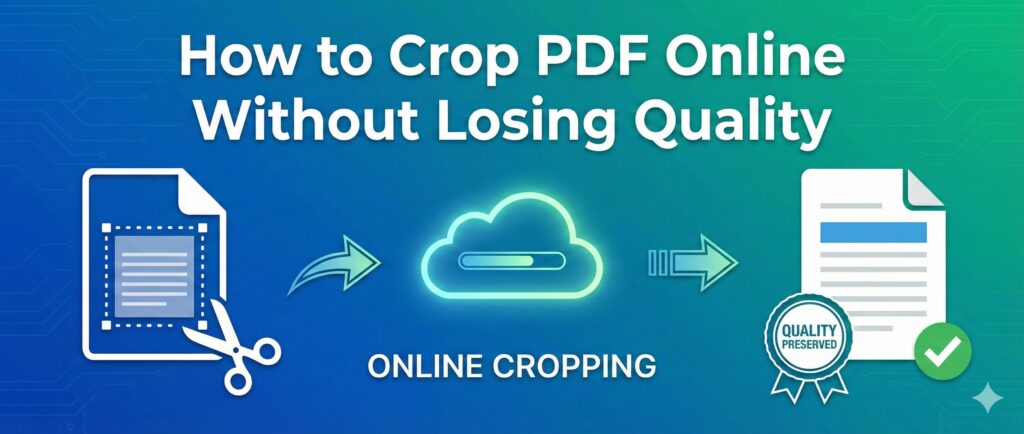
PDFs are one of the most widely used file formats today for business documents, presentations, and personal use. However, the content inside a PDF is not always perfectly aligned or formatted. In such cases, you may need to crop PDF pages to remove unnecessary sections or focus on a specific part of the document without affecting its quality.
But, when cropping PDFs, quality loss is a major concern. After all, no one wants a document that’s blurry or unclear after editing. In this guide, we’ll show you how to crop PDF files online without losing any quality, ensuring your document looks professional and sharp after the changes.
Why Cropping PDF Files Can Be Necessary
There are many situations where cropping a PDF is useful:
- Removing Unwanted Margins: Sometimes, PDF documents have excessive white space or irrelevant content that you don’t need.
- Focusing on Key Information: Cropping allows you to highlight or zoom into specific parts of the document without the distractions of extra content.
- Improving Document Presentation: Clean, cropped PDFs look more polished, especially for business or academic presentations.
While these are all valid reasons to crop a PDF, it’s crucial that the quality of the document is maintained during the process.
Can You Crop a PDF Without Losing Quality?
Yes, it is absolutely possible to crop a PDF without compromising its quality, but you need the right tools and approach. The key lies in using a reliable PDF crop tool that doesn’t compress or degrade the content after editing.
How to Crop PDF Online Without Losing Quality
Here’s a simple, step-by-step guide to cropping your PDF file online without losing quality. We’ll focus on using an online PDF crop tool like Fast2Convert which ensures the final file maintains its original resolution and clarity.
Step 1: Upload Your PDF File
Start by uploading your PDF document to a trusted online tool like Fast2Convert or any other crop tool you prefer. Most tools have a simple drag-and-drop option for uploading files directly from your device or cloud storage.
Step 2: Choose the Crop Area
Once your file is uploaded, the tool will display a preview of your document. Here, you can select the area of the PDF that you want to keep. You’ll have the option to adjust the cropping box by dragging its edges to fit the section you need.
- Make sure you only select the part of the document that is relevant to your needs.
- Some tools may let you crop multiple pages at once, which can be useful for batch editing.
Step 3: Apply the Crop
After selecting the area, click on the “Crop” button. The tool will process your request and remove the unwanted parts of the PDF.
Step 4: Download Your Cropped PDF
Once the cropping process is complete, the tool will offer you the option to download the newly cropped PDF. The key benefit here is that the file will not lose its quality. Since the cropping is a simple frame adjustment, there’s no re-compression or pixelation involved.
Why Choose Online PDF Cropping Tools for Quality?
Online PDF crop tools often preserve the original resolution and clarity of the document because they don’t compress or reduce the quality of the file. Here are some reasons why these tools are ideal:
- No Quality Loss: Unlike some desktop applications, many online tools don’t alter the quality of the content when cropping.
- Easy to Use: With just a few clicks, you can crop your PDF without needing to download or install any software.
- Secure and Reliable: Trusted online tools ensure your data is processed securely without storing your documents after the operation is complete.
- Free and Accessible: Many online tools offer free PDF cropping services, and they are easily accessible from any device with an internet connection.
Common Mistakes to Avoid While Cropping PDFs
While cropping PDFs, here are a few things you should watch out for:
- Cropping Too Much: Be careful not to crop out important content that may be vital to the document.
- Quality Check: Always preview your cropped PDF before downloading it to ensure no text or images have been distorted.
- Tool Quality: Not all online PDF crop tools are created equal. Make sure you’re using a reliable and well-reviewed service to avoid issues with document quality.
Conclusion
Cropping PDFs online is an essential skill for managing your documents efficiently, whether you’re cleaning up a business report, academic papers, or personal files. By using the right tool, you can crop your PDFs quickly without losing any quality, ensuring your documents remain sharp, clear, and professional.
So, next time you need to crop a PDF, don’t worry about the loss of resolution—just choose a reliable PDF crop tool and follow the simple steps outlined above. It’s an easy, fast, and effective way to enhance your documents without compromising their clarity.
❓ Frequently Asked Questions (FAQ) for crop pdf
1. How can I crop PDF online without losing quality?
You can crop PDF online without losing quality by using a reliable PDF crop tool that preserves original resolution and formatting. Always preview the file before downloading.
2. Is it possible to crop PDF pages for free?
Yes, many online tools allow you to crop PDF pages for free without registration or software installation.
3. Will cropping a PDF reduce image or text clarity?
No, cropping only removes unwanted margins or areas. It does not reduce the original text or image resolution.
4. Can I crop a scanned PDF without making it blurry?
Yes, if the tool maintains the original DPI and resolution, scanned PDFs can be cropped without becoming blurry.
5. How do I crop specific pages in a PDF file?
Upload your PDF, select the page you want to crop, adjust the crop area, and download the updated file.
6. Can I crop PDF on mobile without installing an app?
Yes, online PDF crop tools work directly in mobile browsers without requiring any app download.
7. Is cropping a PDF safe online?
It is safe if you use a secure HTTPS website that does not store files permanently.
8. Does cropping change the PDF file size?
Cropping may slightly reduce file size if large image areas are removed, but the change is usually minimal.
9. Can I remove white margins from a PDF without affecting content?
Yes, cropping is commonly used to remove white margins while keeping the main content intact.
10. What is the best free tool to crop PDF online without quality loss?
The best tool is one that maintains original formatting, supports multiple pages, and offers secure file processing without watermarks.